
If you are a freelancer, a business owner, or a small company, your website is (or should be) your main way of gaining attention and leads. It is your working tool, and it should be effective, optimized, secure, and profitable. Your site likely uses WordPress (otherwise you wouldn’t be reading this article, right?) and it can be hard to find the right plugins. There is a wide selection for every need, so here I provide a list of the Maintenance/Security/Marketing plugins that I use (or have used) on my site or for the clients I assist.
A site that ranks well and satisfies your visitors starts with fast loading times. If this time is too long, visitors will get frustrated and leave, and Google will decrease its ranking in search results.
WordPress: 13 plugins I use every day
If your site is running slow, WP-Rocket is the answer. I used W3 Total Cache for some time to enhance the speed of this site, then I heard many positive reviews about WP-Rocket and decided to give it a try. Created by a French group, WP-Rocket helps you reduce the loading time of your page by doing a series of tasks for you (caching, compressing and minifying CSS, JS, and HTML files, loading only the images that are visible, etc.)
It is worth noting that WP-Rocket is not free; it costs $39 per year, but it is worth the investment. First of all, its setup is very easy while providing the same options as its competitors. I remember the many hours spent figuring out and understanding the different features available in the setup guides of other plugins in the same category.
Articulos que te pueden interesar Pierre and Fanny Augé: the recipe for success
In addition, it is truly more effective than other plugins of a similar kind. Lastly, to top it off, there are often promotions available to get a much cheaper renewal. I personally really value the work and support from the WP-Rocket team, and I highly recommend it to you (and I receive no payment for this recommendation!)
Redirect is a plugin to manage your 301 redirects, monitor 404 errors, and send any old URLs to a different page. You know that in SEO it is crucial to prevent URL mistakes, and this plugin is perfect for that.
If you are migrating pages from one site to another or if you are changing the installation directory of your WordPress installation, Redirection will be an interesting ally. Plus, it automatically handles 301 redirects for a post or page if you change the permalink (and even if you change the percalines of the entire site!)
WordPress is an excellent platform for building your site, but its popularity is also one of its weaknesses as it puts it at the forefront of attack attempts. It is absolutely essential that you have a backup system set up on your website.
Articulos que te pueden interesar Why your content marketing is a failure
A piece of advice: never rely on your host for this, assume your responsibilities, it is your work tool and must always be perfectly functional. Imagine losing all your work, all your blog posts, content you offer for download, etc. That’s all, did a little shiver run down your spine?
With BackWPup you can manually create complete backups of your website (database and files) or schedule them automatically and regularly. These backups can be stored directly on your web space (not very smart if you get hacked…) or sent to your Dropbox account, Google Drive, etc. You can keep several old backups, the number must be defined manually. It’s a real comfort and feeling of security to know that your data is completely safe!
Wordfence is free and open source
and allows you to manage the security of your website. It can scan all your WordPress files and compare them with the original files (including themes and plugins). If malicious code is found, Wordfence offers to replace your files with the originals.
But Wordfence goes further and also acts as a firewall by blocking attacks and malicious traffic, fake GoogleBots, hacker scans, etc. Strengthen login security and scan your site in the background. The possibilities are numerous and make it a must. Personally today I no longer use it because I no longer have any use for it, thanks to some tools that I mention just below.
Block Bad Queries (BBQ, pronounced Barbecue) is a simple script to block query attempts on malicious URLs. BBQ monitors all incoming traffic and politely blocks any requests containing singular code (base64_ and any requests that are too long).
So, obviously, it would be possible to configure all of this in the .htaccess file but for the less technical among us, this is an essential plugin as it is one of hackers’ favorite ways to access WordPress installations.
A simple plugin that allows you to limit the number of connections to your site’s admin interface. For smart people trying to break into your admin interface using a script, the number of login and password entry errors is limited and produces an error that prevents you from trying again. That’s it, but it’s quite useful. This plugin may prove useless if you choose the following plugin.
ESSENTIAL! Nothing less. If you are experiencing security issues with WordPress, Move login it might just be the plugin to save you. It allows you to change the login address of your site. Instead of using or you can choose, for example, the address you prefer. Thus equipped, your site becomes practically impregnable!
Do we really need to introduce this? It is undoubtedly the most popular plug-in in its category and therefore I am not very original in recommending it to you.
Its instructions and related advice (even more so in the paid version) make it a great step-by-step cheat sheet to not lose the SEO of your pages and articles. It analyzes your titles, descriptions, keywords for search engines and also helps you manage the presentation of your articles on social networks Facebook and Twitter. Yet I abandoned the most famous SEO plugin for several months now. Below are two alternatives.
As a challenger, Rank Math SEO is determined to take its place and even dethrone the incumbent leader.
The step-by-step suggestions are very well integrated and the plugin also offers keyword suggestions. Social network integration, SERP preview and Rich Snippets are included. Easy to install and get started, I also appreciate the integration of Google Search Console into the WordPress backoffice.
Easy Digital Downloads is a WordPress plugin to manage the sale of digital products via downloads (ebooks, plug-ins, software, Office resources, templates and more). Fairly simple to set up, it allows you to manage your resources and sales automatically.
This plugin is free for the most basic features, but most add-ons require a cost. They are not necessarily essential, it all depends on your needs. For my part, I bought two:
- Conditional successful redirects: Allows you to use per-product confirmation pages for purchased products
- Free Downloads: Make it easy to get free downloads (ebooks, etc.)
However, there are others that will further expand the possibilities such as recurring payments, software licensing, connecting your customers to your MailChimp database, etc. The possibilities are numerous and I invite you to take a look.
Another plugin to manage the social aspect of your blog. Without social networks, content marketing is deprived of community and potential virality. There are many plug-ins of this type and it is not always easy to choose the right one. This allows:
- add share buttons in key places (before or after the article, as banners on the side of the screen, in pop-ups, etc.)
- add Follow buttons from your favorite social media
- to encourage sharing of your articles, images, etc.
- to analyze the number of shares.
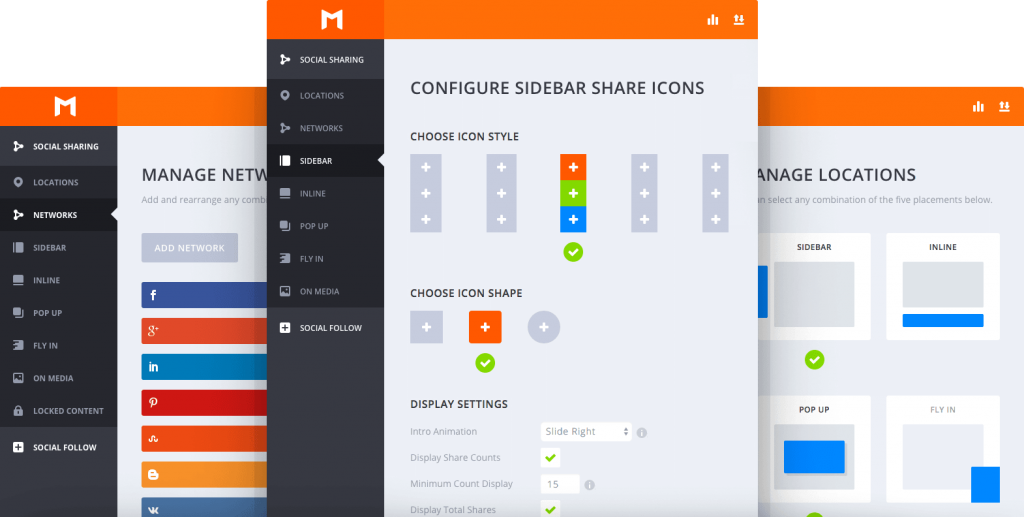
It is designed by the ElegantThemes team, the same one that revamped WordPress themes with its excellent DIVI. The main concern of this plugin is its economic model. At ElegantThemes you pay an annual subscription or lifetime price and can use as many themes and plugins as you want. If you’re already a Divi user, Monarch is a good solution.
Inbound Now is an inbound marketing suite adapted for WordPress. This platform allows you to manage:
If this suite costs (the basic version is free, you could already take a look at it), it represents only $10 per month, more expensive than Mautic which is completely free and open source but more accessible than a Hubspot for example.
I regret the rather poor documentation. If the installation is well documented, the rest is a little more complicated. Once set up, it works fine. I’m in the testing phase of this product and will definitely come back to it later if it suits me.
Its name speaks for itself, YARPP is a plugin that allows you to add a list of related articles wherever you want. This helps reduce your bounce rate (a little) and therefore sends a signal of good health of your site to search engines. It’s free, it does its job very well and I recommend it to you with my eyes closed!
Conclusion
A good WordPress installation can ensure that your site works for you and, most importantly, that you don’t waste time unnecessarily. Your website is a work tool, it must not be a source of difficulty. To do this you need to do things right from the start.
And you, which plugins and tools are suitable for WordPress that you use on a daily basis? Are we talking about it?
latest posts published

Personal Branding or cult of personality?

6 Key SEO Steps Before Launching a New Website

Communicating during the financial crisis

11 good resolutions to give a boost to your 2019

It all starts with an idea

6 marketing and creativity books to read this year!

Content Marketing: Do You Really Have to Offer All Your Content?

Entrepreneurs and content marketing: 16 quotes to encourage you

9 tips to increase your blog audience!